dPanel launches a new Ubuntu server (a VM) in your own cloud account from one form: pick the provider, the region, the size and the Ubuntu release, and dPanel creates the machine, installs its agent and opens SSH, HTTP and HTTPS. It is ready in about 10 to 20 minutes.
This walkthrough uses Google Cloud. The other providers ask the same questions in the same order. The differences are on Cloud providers, with a page for each provider.
What you need first
- An SSH key and a cloud account in dPanel. See Before you start.
- Enough quota at your provider for one more machine.
Open the form
Open Servers, then Create Server, then Launch a server.
The form is one page with three numbered steps. The Review panel on the right fills in as you answer. Its counter, such as 3/9, is how many answers dPanel has so far.
Step 1: Provider and project
- Provider: pick where the machine runs.
- Cloud project: pick which of your cloud accounts pays for it. Add project connects another.
- SSH key: pick the key dPanel uses to reach the machine. Create SSH key makes one here.
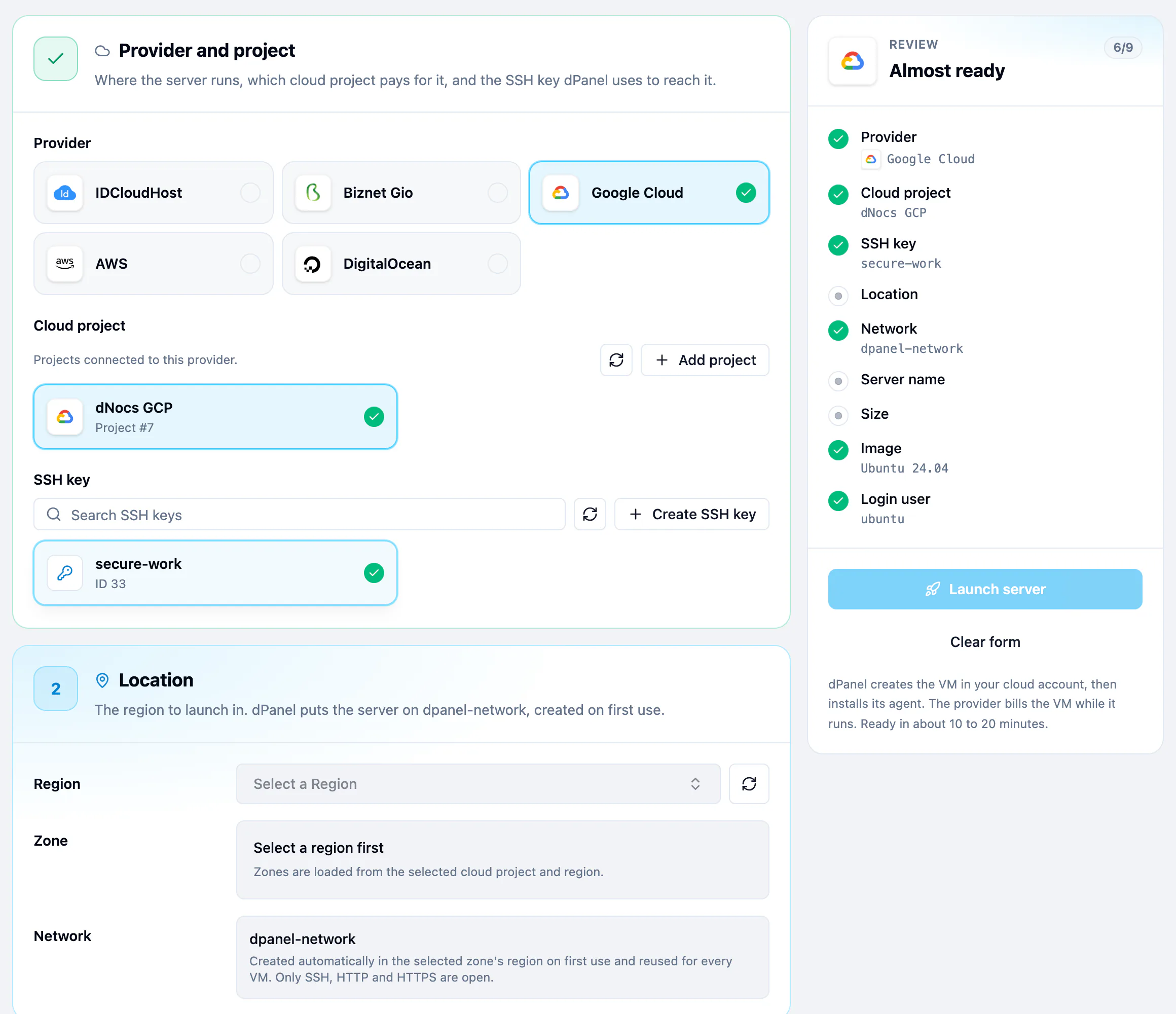
Step 2: Location
- Region is the part of the world the machine runs in. Pick one close to your users.
- Zone is one data centre inside that region. Any of them is fine. Google Cloud, Alibaba Cloud and Tencent Cloud ask for one.
- Network is filled in for you. On most providers dPanel creates
dpanel-networkthe first time it launches in a region, then reuses it. Only SSH, HTTP and HTTPS are open.
Step 3: Size and image
- Server name is how the machine appears in dPanel and at your provider.
- Ubuntu release: 24.04 LTS is selected by default; 26.04 LTS is marked Newest. LTS means years of security updates.
- Size: move the CPU and RAM sliders to the size you want, and Storage to the disk size in GB.
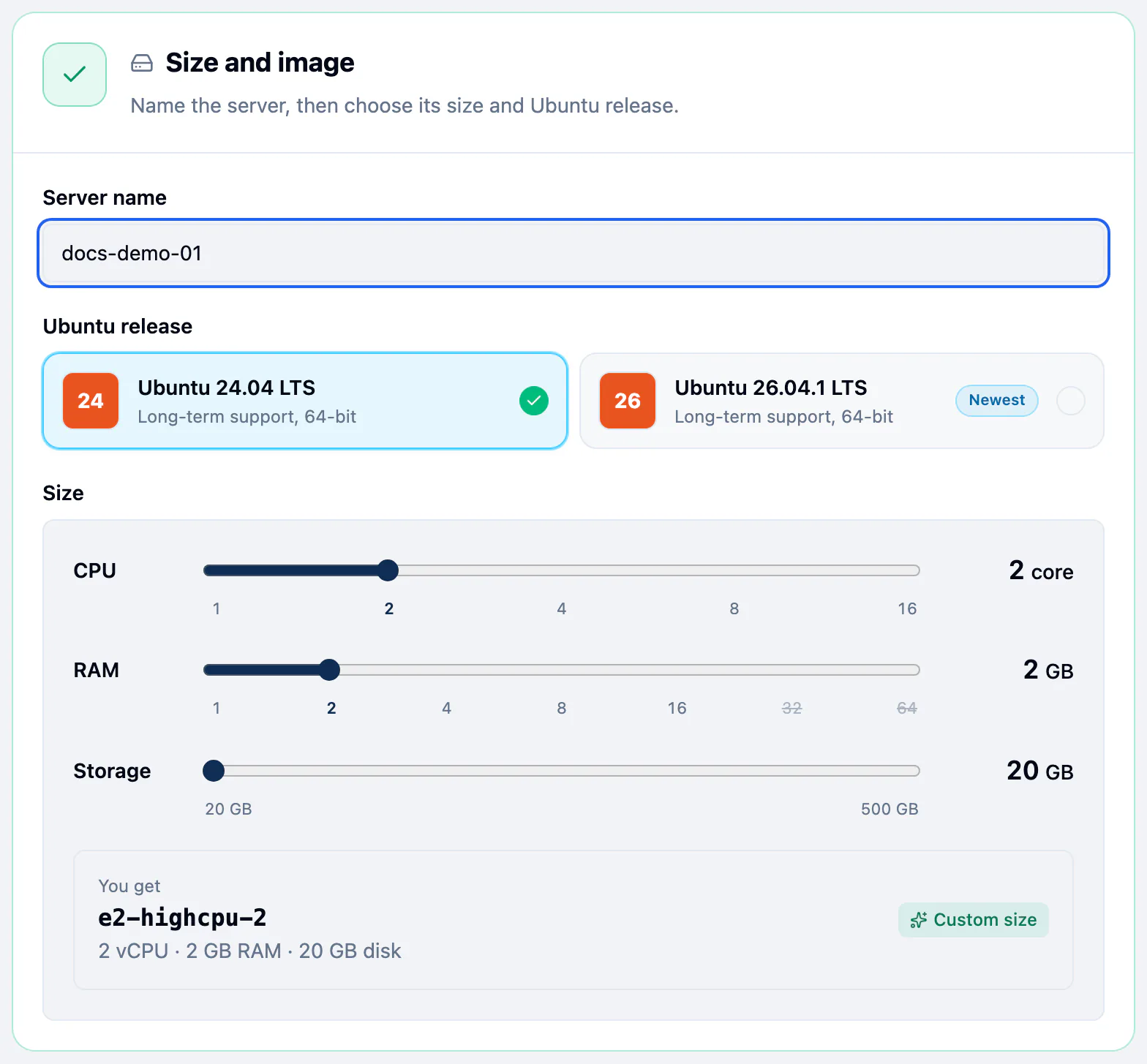
The card under the sliders says exactly what you will get:
- You get: providers that take any CPU and memory pair, such as Google Cloud and IDCloudHost, launch exactly that size.
- Cheapest match: providers with fixed instance types, such as AWS, DigitalOcean, Alibaba Cloud and Tencent Cloud, launch the cheapest type with at least that much CPU and memory. Rounded up from says when the type is bigger than you asked for, and the card shows the monthly price when the provider gives one.
| Slider | Range |
|---|---|
| CPU | 1, 2, 4, 8 or 16 vCPU. A value the provider cannot serve is crossed out. |
| RAM | 1 to 64 GB. Moving CPU moves RAM to the nearest pair the provider sells. |
| Storage | 20 to 500 GB in 10 GB steps (40 to 500 GB on Alibaba Cloud). DigitalOcean and Tencent Cloud set it for you. |
On a provider with fixed types, Choose the instance type yourself opens the provider's full list instead of the sliders. Use the size sliders instead goes back. Biznet Gio keeps its own Product and Billing Cycle pickers.
Launch
When the Review panel says Ready to launch, every answer is in.
- Press Launch server.
- In Server setup started, press Open server to watch it come up, or Create another.
Clear form starts over.
What happens next
A blue banner says dPanel is setting the server up. Expect 10 to 20 minutes:
- The provider creates the machine.
- dPanel installs its agent and reads what is on the machine.
- dPanel opens the ports it needs.
When the banner goes and the badge reads Ready, the server is yours to use. Next, install software on it or create an application.
Frequently asked questions
How long does it take to launch a server?
About 10 to 20 minutes from Launch server to Ready. Most of it is the provider creating the VM and dPanel installing its agent.
Which Ubuntu versions can I launch?
Ubuntu 24.04 LTS and 26.04 LTS. dPanel picks the provider's current image for the release you choose.
How much does a server cost?
Your provider bills you at its own prices, because the server runs in your account. On providers with fixed instance types, the size card shows the provider's monthly price when it is available.
Can I choose an exact instance type, such as t3.small?
Yes, on AWS, DigitalOcean, Alibaba Cloud and Tencent Cloud. Press Choose the instance type yourself under the sliders and pick from the provider's list.
Which login user does the server get?
ubuntu on AWS, Google Cloud and Tencent Cloud, root on Alibaba Cloud, and the Default User you set (dpanel by default) on DigitalOcean and IDCloudHost. See Connect over SSH.