dPanel installs software on a server through modules: open the server's Modules tab, press Add module, pick one, and dPanel installs it for you. A module is a tested recipe for a database, a language runtime or a tool: you answer a few questions, and dPanel installs, configures and starts it on the server as a systemd service (a program Linux keeps running in the background), then keeps track of what it put there. You don't need SSH or apt. New to these words? See the Glossary.
Open the catalogue
- Open the server and go to Modules.
- Press Add module.
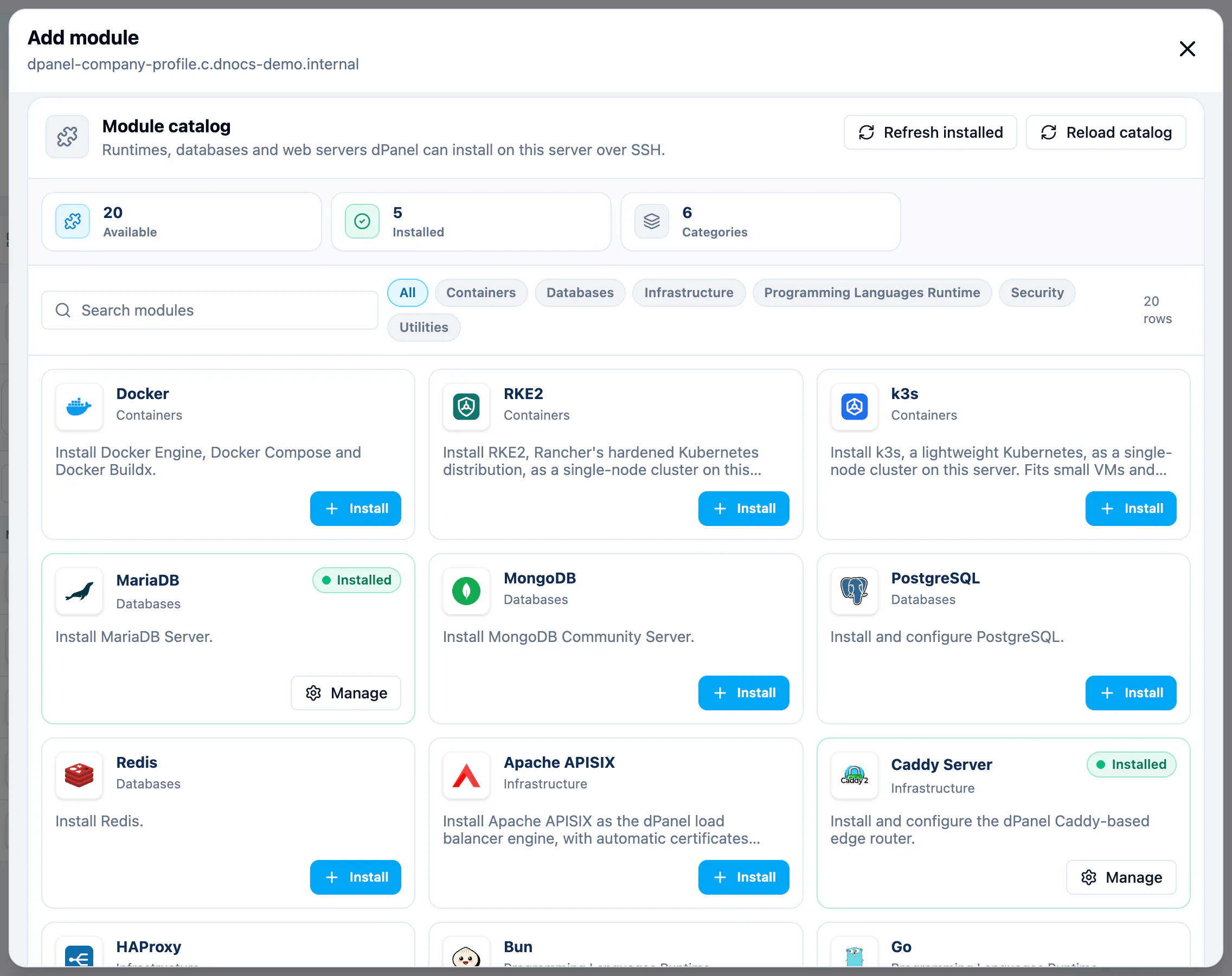
The Module catalog groups what is available. Filter by category or type in Search modules. Modules already on the server are marked Installed, with Manage instead of Install.
| Category | Examples |
|---|---|
| Containers | Docker, and k3s or RKE2 for a one-server Kubernetes |
| Databases | MariaDB, PostgreSQL, MongoDB, Redis |
| Infrastructure | Caddy Server, Apache APISIX and HAProxy, the load balancer engines |
| Programming Languages Runtime | Node.js, Bun, Go, PHP, Python, Ruby, UV |
| Security | Firewall, managed from the server's Firewall view |
| Utilities | FFmpeg, FrankenPHP |
Pick a version
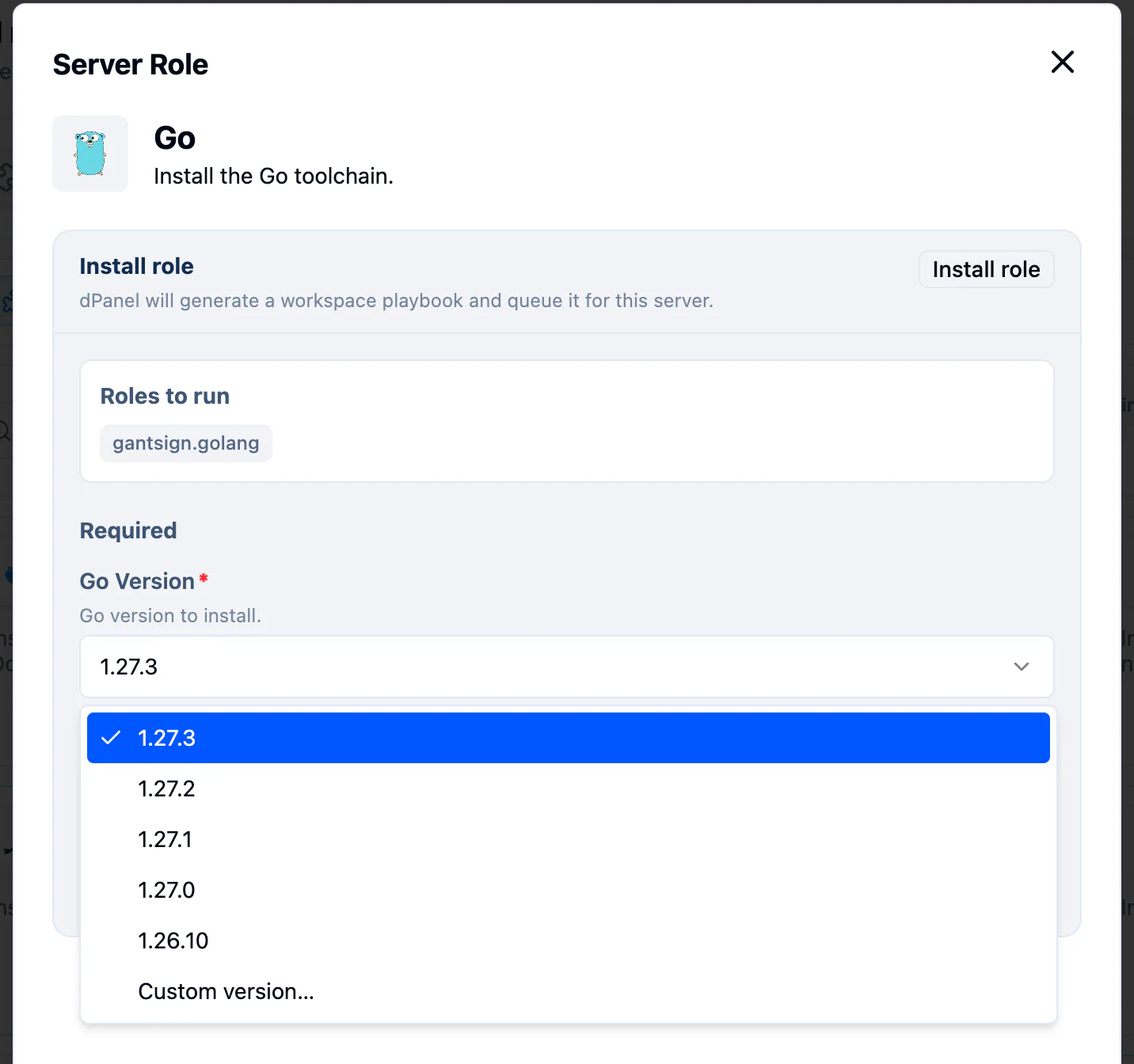
Where a module installs a version of something, its version field is a list of the newest releases, newest first. Keep the first one unless your application needs an older one.
Need a release that is not listed? If the list ends with Custom version…, pick it and type the release, in the same format as the listed ones (for example 1.26.4). dPanel checks the format before it installs.
Install a database
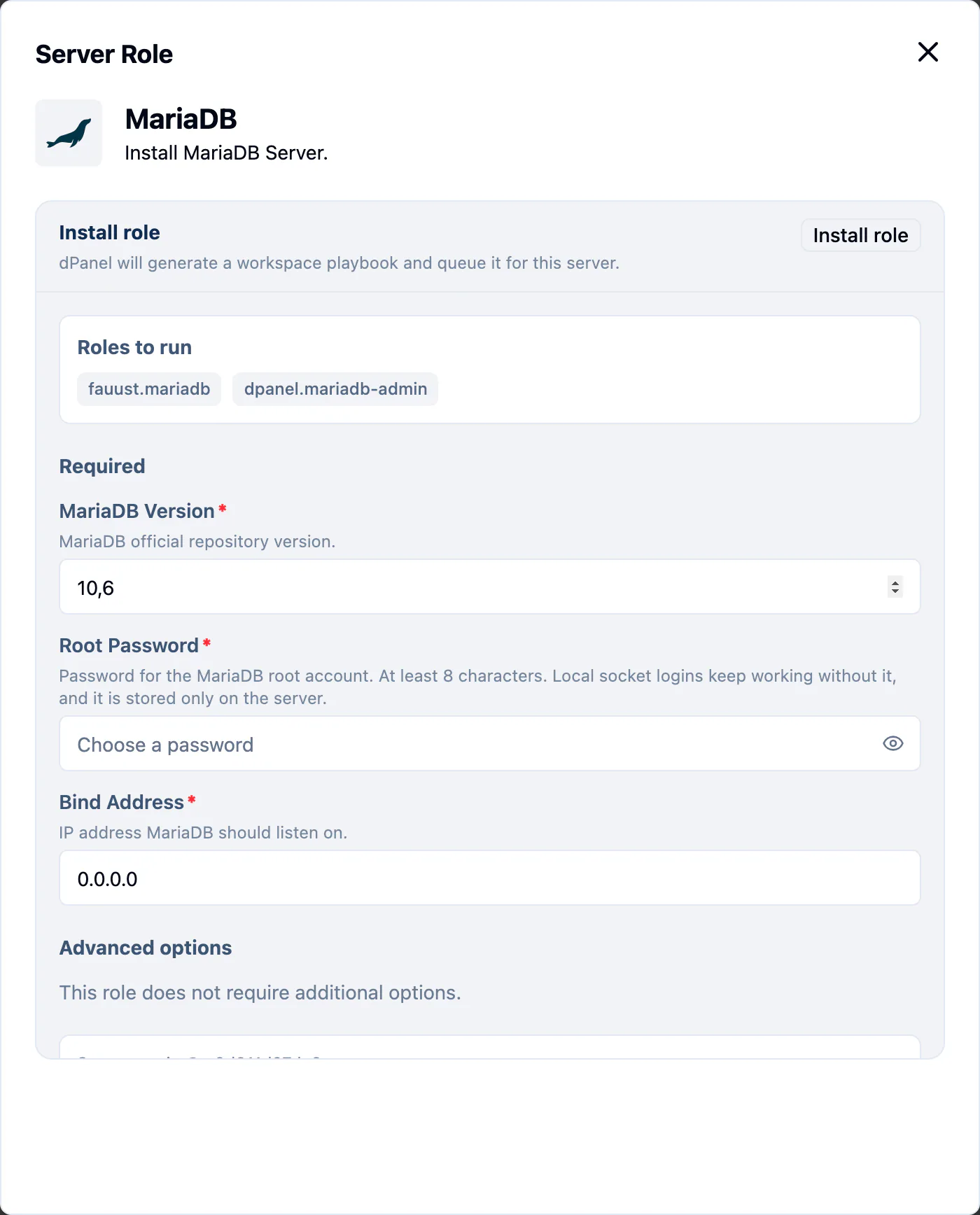
- Press Install on the module you want, for example MariaDB.
- The form lists the Roles to run and asks only for what it can't decide for you. For MariaDB that is MariaDB Version, Root Password and Bind Address.
- Press Install role and confirm.
What happens next
The module appears on the Modules tab as Installing. A database takes a few minutes. When it is done:
- The Modules tab shows it as Installed, with its version.
- The Overview tab lists it under What runs here.
- The Services tab shows its service running.
If it reads Failed, open the module to see why, fix the cause, and install it again.
The Modules tab
The Modules tab lists one row per module with its versions and status (Installed, Installing, Failed, or Mixed when versions differ). The Modules, Installed and Needs attention counts include top-level modules only: databases you create on MariaDB or PostgreSQL appear inside that module's Manage view, not as their own rows.
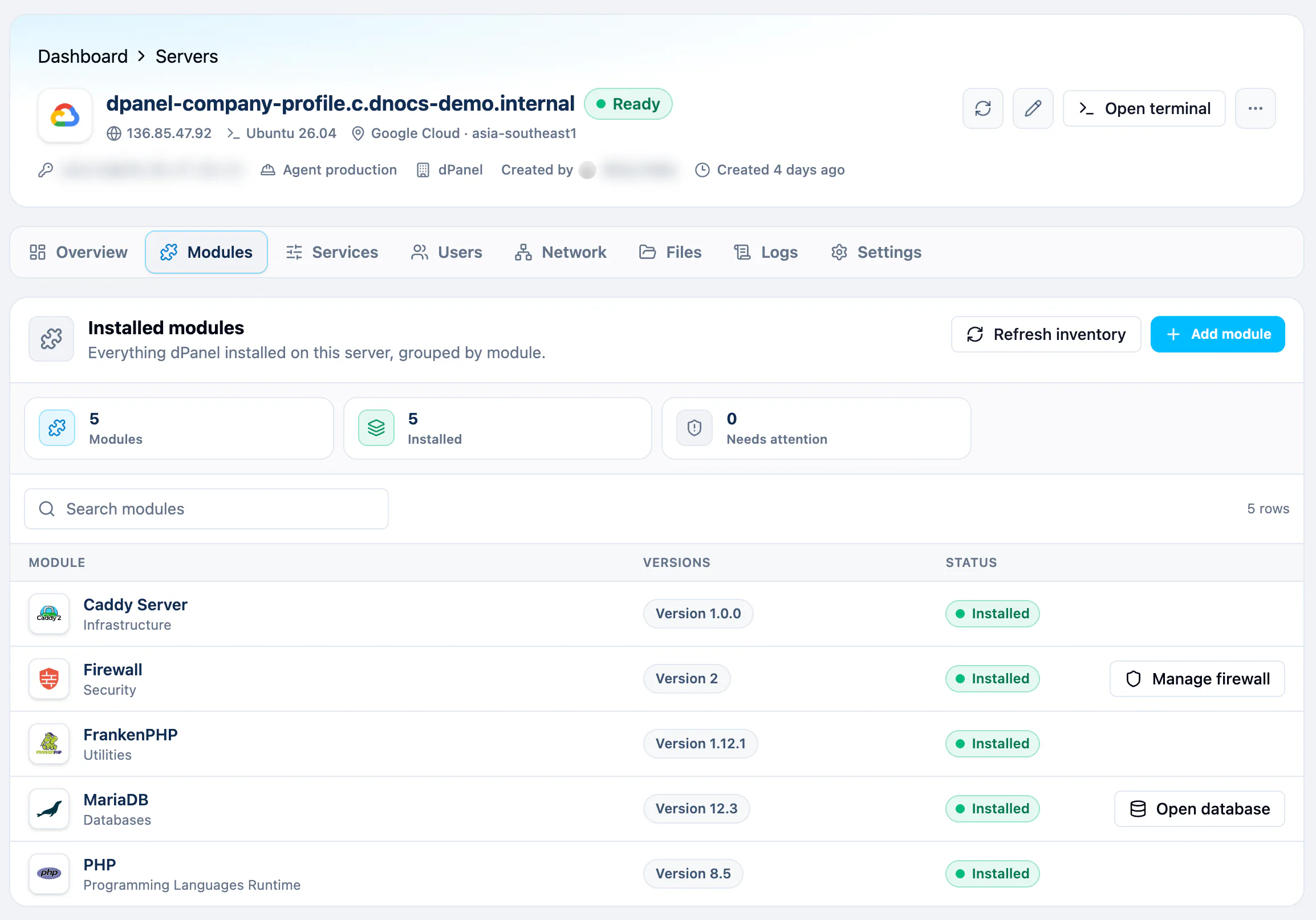
- Refresh inventory asks the agent what is on the server now. A module the agent no longer reports, for example one you removed by hand, drops off the list.
- Select a version chip to see what dPanel recorded about that install. Uninstall there removes the record from dPanel only; the software stays on the server.
- Open database (MariaDB, PostgreSQL) and Manage firewall (Firewall) are shortcuts. See below and Firewall.
Manage the database
Once MariaDB or PostgreSQL reads Installed, its row on the Modules tab has Open database. It opens the database manager at dbmanager.devetek.app in a new tab, already signed in with your dPanel account and pointed at that server.
- Press Open database. You can also open the module and press Open database there.
- Check the engine, enter the database user (MariaDB uses
root, PostgreSQL uses the admin user you chose) and the password you set when you installed it. - Press Connect.
From there you can browse tables, run queries, and create databases and users with read-only or read-write access.
The database manager reaches the database through the server's SSH connection, so the database never needs to be open to the internet. You can open it on servers you can edit: your own servers, and servers in a workspace where you have editor access or more.
Create a database for an application
An application such as WordPress or Laravel needs its own database and a user that can only reach it. You create both from the database server's own module, without its administrator password:
- On the Modules tab, press Add module, then Manage on MariaDB or PostgreSQL. It must already be Installed.
- Under Databases, press Create database. The section lists the databases you created on this server.
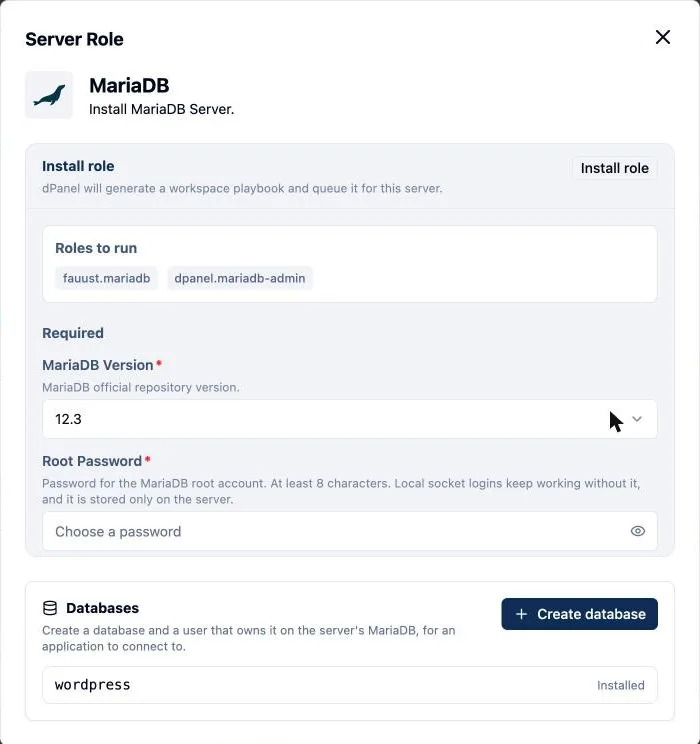
- Enter Database Name and Database User, and a Database Password of at least 8 characters. PostgreSQL names use lowercase letters, digits and underscores.
- Press Install role.
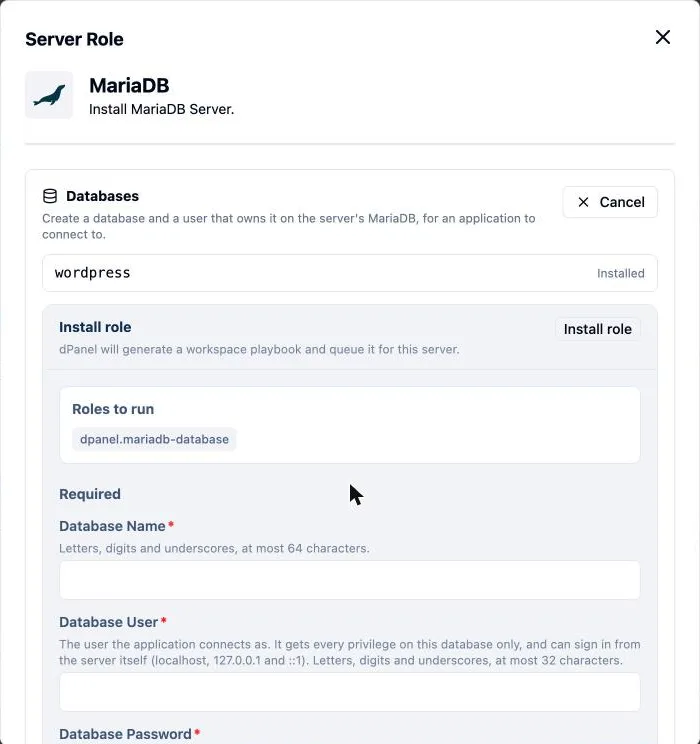
dPanel creates the database and the user, gives the user every privilege on that database only, and lets it sign in from the server itself (127.0.0.1), which is how an application on the same server connects. Creating the same database name again with a new password changes the user's password.
Point the application at it with runtime variables: host 127.0.0.1, port 3306 for MariaDB or 5432 for PostgreSQL, the database name, the user and the password. See Environment variables.
You can also ask Ask dPanel to install a module or create an application database for you; it generates the password and shows it to you once. See Prompt cookbook.
From the terminal
The dnocs CLI installs the same modules. Install it with AI in the terminal.
dnocs module list --server-id 140                      # the catalog for this server
dnocs module install nodejs --server-id 140 --var nodejs.nodejs_version=22
dnocs module install postgresql --server-id 140 --generate-secrets
dnocs module installed --server-id 140                 # what is installed, with IDs
--generate-secrets creates any required password, such as a database admin password, and saves it to a file only you can read; it prints the file's path, never the value.
Many servers at once
A server group installs the same module on every member in one operation, and shows the result per server. Groups are under Servers, then Server groups. See Generic server groups.
Frequently asked questions
Do I need to install a runtime before I deploy an application?
No. When you create an application, you pick its runtime as a dependency and dPanel installs it on the server.
Why don't my application databases show on the Modules tab?
They belong to their database server. Open Add module, then Manage on MariaDB or PostgreSQL, and look under Databases.
I removed software by hand. Why is it still listed?
dPanel shows what the agent last reported. Press Refresh inventory; modules the agent no longer finds drop off the list.
Does Uninstall remove the software from my server?
No. Uninstall on a version chip removes dPanel's record only. The package, its data and its service stay on the server.
Can I install a version that is not in the list?
Yes, on modules that allow it: pick Custom version… and type the release, in the same format as the listed versions.